

By Emma Roth | Updated for Digital Consumers
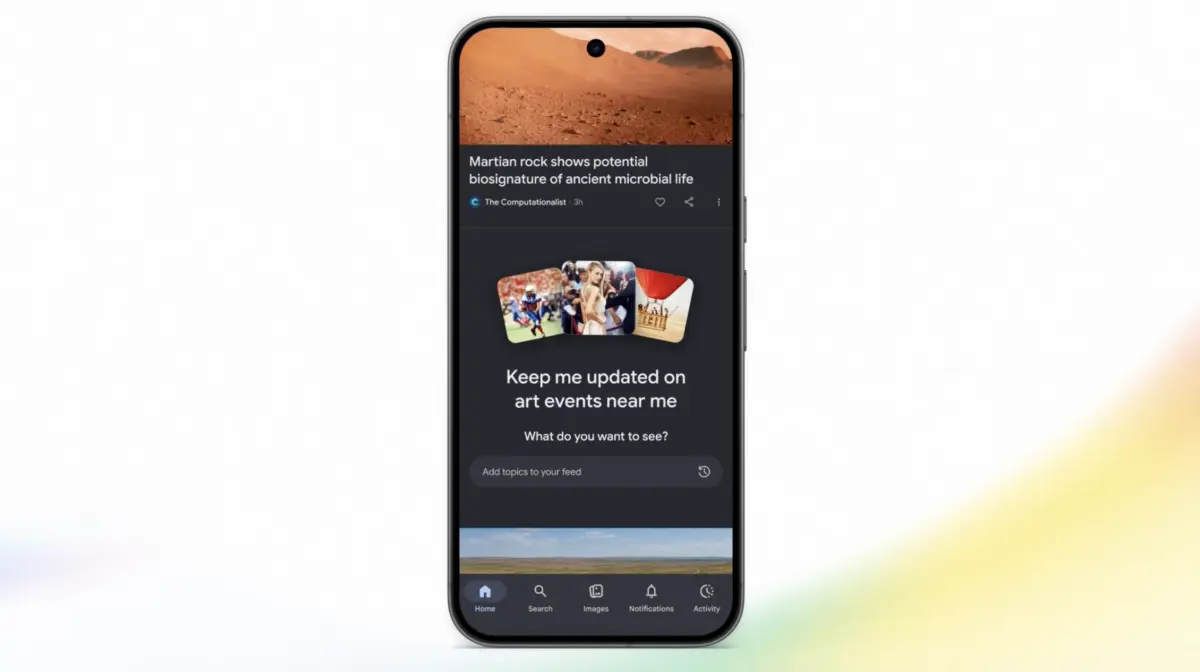
Google is rolling out a major update to the Google app that grants users direct conversational control over their Discover feeds using artificial intelligence. Instead of relying entirely on algorithmic assumptions derived from search history and app usage, users will soon be able to articulate precisely what content they wish to see—and what they prefer to filter out.
The feature, which Google announced is rolling out globally in the coming days, represents a broader industry shift toward generative AI-driven content curation. Alongside the Discover feed overhaul, Google is introducing granular updates to Android’s Google News audio briefings and streamlining its "Preferred Sources" publisher integration across Search, AI Overviews, and AI Mode.
Main Facts: What’s Changing?
The core of Google’s latest announcement centers on user autonomy and conversational configuration. Here are the primary updates coming to the Google ecosystem:
- Conversational Discover Feed Customization: Users can access a new AI-driven chatbot interface through the three-dot menu on any Google Discover card. By typing or speaking descriptive preferences (e.g., "Show me more articles about space exploration and indie game development, but fewer celebrity gossip pieces"), the system will re-tailor the feed.
- Persistent Memory: The AI will "remember" these conversational inputs, applying user-defined parameters to future visits while allowing continuous refinement.
- Customizable Audio Briefings: Android users of the Google News app can now tailor their daily audio briefings, selecting specific topics, formats, and areas of interest to listen to on the go.
- Streamlined Preferred Sources: Publishers can now embed interactive "Preferred Sources" buttons directly onto their websites. Readers can click these buttons to add an outlet to their priority lists for Search’s "Top Stories," AI Overviews, and AI Mode without leaving the publisher’s page.
Chronology: The Evolution of Algorithmic Feed Control
The journey toward conversational, AI-driven content curation has accelerated rapidly over the last few years as users demand more transparency and agency over their digital diets.
1. The Era of Black-Box Algorithms (2010s–Early 2020s)
For over a decade, Google Discover (formerly Google Feed) and major social media platforms relied on opaque backend algorithms. These systems analyzed clicks, dwell time, location data, and search histories to predict user interest. While effective at driving engagement, users frequently complained about sudden shifts in content quality, echo chambers, and an inability to course-correct the algorithm when it misinterpreted their habits.
2. The Rise of Generative AI Curation (2024–2025)
As generative AI matured, tech companies began experimenting with prompt-based algorithm tuning. Platforms like Meta (Instagram), X (via Grok), Bluesky (through custom AI feeds), and YouTube introduced features allowing users to explicitly mold their feeds using natural language prompts rather than digging through complex settings menus or endless blocks of toggle switches.

3. Google’s Conversational Integration (Present)
With the introduction of the chatbot-style interface in the Google app, Google is bridging the gap between passive algorithmic observation and active user collaboration. The roll-out marks a milestone in how everyday utilities incorporate large language models (LLMs) not just for search queries, but for user-experience personalization.
Supporting Data & Industry Context
Google’s move does not happen in a vacuum. The pressure to give users control over recommendation engines stems from shifting regulatory landscapes, user fatigue, and aggressive moves by competitors in the social and search spaces:
- Platform-Wide AI Integration:
- YouTube: Recently rolled out features allowing custom AI-driven feed prompts.
- Instagram: Tested algorithm tweaks enabling users to explicitly tell the main feed what content categories to emphasize.
- Bluesky & X: Both platforms have integrated decentralized or LLM-driven timeline curation tools (such as Bluesky’s Attie AI custom feeds and X’s Grok timeline tools) to keep users engaged amidst fierce competition.
- User Frustration Metrics: Industry studies consistently show that over 60% of daily active users on content-recommendation platforms desire a "reset" or direct tuning button to escape hyper-specific algorithmic loops. Google Discover, reaching hundreds of millions of Android and iOS users globally via the Google app, represents one of the largest testbeds for conversational curation to date.
Official Responses and Mechanics
Google has detailed the exact mechanics of how the new Discover feature operates under the hood.
According to product documentation shared by Google, accessing the tool is straightforward:
- Open the Google app and navigate to your Discover feed.
- Tap the three-dot menu located on any recommendation card.
- Select the new customization prompt option, which opens a chatbot-style dialogue window.
- Describe your content preferences in natural language.
- Review the AI’s confirmation message, which breaks down the specific content buckets it will prioritize.
- Make manual adjustments if necessary, then tap "Refresh your feed" to apply the changes instantly.
"The system is designed not just to take a one-off command, but to establish a continuous dialogue regarding what you care about," notes Google’s product team in their official release. "By remembering these preferences, future visits to the Discover feed will dynamically filter out noise while surfacing high-relevance topics."
For publishers, the update to Preferred Sources offers a direct pipeline to loyal readers. Instead of forcing users to navigate complex backend settings to favorite a news outlet, the new interactive website button removes friction entirely, ensuring that trusted sources maintain visibility across traditional Search, AI Overviews, and the newly launched AI Mode.
Implications: What This Means for Users and Publishers
The introduction of conversational AI feed controls carries significant implications for both consumers and the digital media landscape.

For Consumers: Greater Agency, Less Frustration
For years, digital consumers have felt at the mercy of opaque recommendation engines. If a user searched for a medical condition out of sheer curiosity, their Discover feed would often become flooded with health-related articles for weeks.
With the new conversational tool, correcting such algorithmic anomalies is as simple as typing: "Ignore my recent search about medical symptoms; return my feed to tech news, cooking, and architecture." This level of user control promises to reduce digital fatigue and make personalized feeds genuinely useful rather than frustratingly repetitive.
For Publishers: The Battle for Preferred Status
The streamlined "Preferred Sources" button is a welcome change for digital publishers who have seen their organic traffic fluctuate wildly due to the rise of AI-generated search summaries (such as Google’s AI Overviews). By allowing publishers to place an interactive button directly on their web pages, Google is handing some distribution power back to media outlets.
However, it also places the onus on publishers to actively encourage their audiences to click the button. Outlets with highly engaged, loyal readerships stand to benefit immensely by securing permanent placement in a user’s top stories and AI Overviews, while niche or smaller publishers may struggle to compete for prime real estate.
The Broader Outlook
As AI continues to intermediate the relationship between human users and the digital content they consume, tools like Google’s conversational Discover customizer point toward a future where "the algorithm" is no longer a mysterious black box, but a collaborative assistant. Whether consumers will actively take the time to chat with their feeds or simply accept default settings remains to be seen, but the option for true personalization has never been more accessible.
