

By Tech & AI News Desk
Published: April 2026
Main Facts
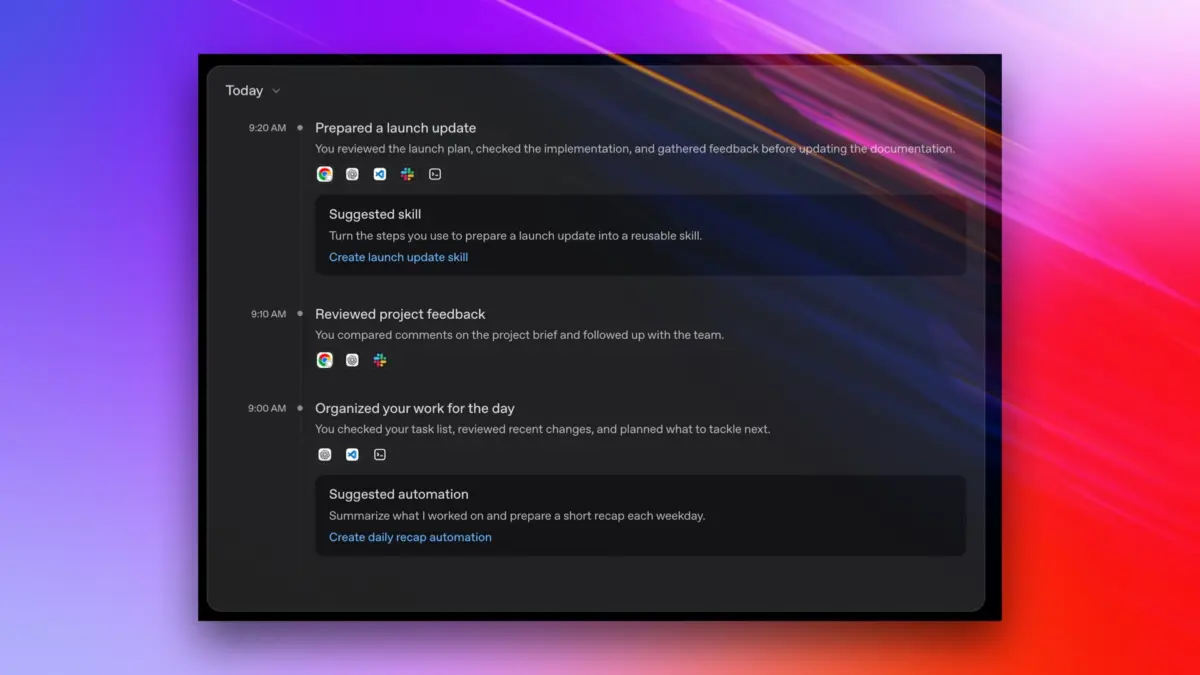
OpenAI has officially launched a powerful new feature for ChatGPT on macOS, dubbed Computer History. Designed exclusively for subscribers of the company’s Pro, Business, and Enterprise plans, the feature builds directly upon OpenAI’s existing "memories" architecture—which has allowed ChatGPT and Codex coding agents to retain contextual background information from past chat sessions since April 2024.
Unlike passive chat logs, Computer History enables ChatGPT to actively log interactions with websites and desktop applications (with explicit user opt-in). By following a user’s digital footsteps, the AI can extrapolate intent, streamline workflows, and create repeatable automated tasks—such as generating custom "skills" for routine actions like video uploads—based entirely on recent workspace activity.
Key parameters of the rollout include:
- Platform Availability: Currently restricted to macOS. Users in the European Economic Area (EEA), Switzerland, and the United Kingdom are excluded from the initial launch due to regional regulatory frameworks.
- Granular Control: Users must manually opt in. They can independently select which applications and websites are monitored, pause tracking entirely, and view or delete their activity history at will. For Business and Enterprise tiers, system administrators retain overarching governance control over whether users can enable the capability.
- Data Handling: Activity summaries are synthesized in the cloud but stored locally on the user’s system. OpenAI states that raw activity files are not retained unless legally mandated and are explicitly excluded from training future AI models.
Chronology of Context-Aware AI
To understand the strategic significance of Computer History, it is vital to trace the rapid evolution of on-device AI tracking and context-gathering tools across the technology sector:

- April 2024: OpenAI introduces "memories" for ChatGPT and Codex, allowing the chatbot to carry forward learned user preferences and contextual history across distinct sessions.
- May 2024: Microsoft announces Windows Recall at its Build conference, a headline-grabbing feature designed to continuously capture screenshots of a user’s PC activity to build an easily searchable timeline. The announcement triggers immediate, severe backlash from cybersecurity researchers and privacy advocates regarding potential data leakage, leading to a swift rollout delay and a major architectural overhaul.
- Late 2024 to Early 2025: OpenAI tests early iterations of screen-context monitoring tools, including a preview mechanism internally and externally referenced as Chronicle.
- Mid-2025: Microsoft begins reintroducing a heavily modified, security-hardened version of Windows Recall to Copilot+ PCs, focusing heavily on local encryption and user opt-in controls.
- April 2026: OpenAI formally replaces its Chronicle preview framework with the release of Computer History for macOS, shifting away from continuous visual capture toward API-based interaction logging.
Supporting Data and Technical Mechanics
The technical execution of OpenAI’s Computer History diverges significantly from competing products like Microsoft’s Windows Recall or OpenAI’s own previous Chronicle preview.
How It Works Under the Hood
Rather than taking continuous screenshots, recording audio, or logging raw microphone input, Computer History leverages the native Accessibility Application Programming Interface (API) built into macOS. According to OpenAI’s technical documentation, the system captures precisely what that API exposes:
- Mouse clicks and navigation patterns
- Text inputs and typing telemetry
- Keyboard shortcuts and hotkeys
- Application switching events
- Immediate workspace context
Synthesis Over Surveillance
Instead of maintaining a visual archive of everything a user sees, hears, or speaks, the system periodically processes these API telemetry events to synthesize a structured summary of actions taken. For example, the system can track and direct a user toward files they have recently examined, but it does not store the raw internal contents of those files unless the user explicitly integrates that content into an active chat session.
Resource Allocation and Constraints
Because Computer History translates user actions into structured logs that feed into ChatGPT’s working context, token management becomes a critical factor. The generation of summaries and memory tokens consumes portions of the user’s active plan token budget and context window size, meaning heavy usage of the feature could subtly impact response lengths or session continuity.
Official Responses and Security Warnings
OpenAI has accompanied the launch of Computer History with explicit security disclosures and architectural disclaimers, acknowledging the inherent risks of granting an AI agent deep visibility into a user’s operating system.

The Security Disclaimer
In the official feature description, OpenAI issues a stark warning to prospective users:
"Computer History files can contain sensitive information. They are not encrypted by Computer History, and other programs running as your macOS user may be able to access them."
While macOS’s built-in FileVault disk encryption offers foundational security against physical theft or unauthorized booting, the lack of end-to-end or application-layer encryption specifically applied to the Computer History log files means that any malicious software (such as malware or spyware) executing under the user’s active macOS account profile could potentially read the raw log data.
Privacy Safeguards
To mitigate enterprise and consumer anxiety, OpenAI has outlined several governance guardrails:
- No Model Training: Data captured via Computer History will not be leveraged to train OpenAI’s foundational large language models.
- Data Retention Limits: OpenAI asserts it does not retain activity logs on its servers unless compelled by legal mandates.
- Administrative Oversight: IT administrators managing Business and Enterprise tiers can establish global policies disabling the feature across corporate fleets, preventing employees from inadvertently exposing proprietary corporate workflows.
Implications for Privacy, Security, and the Future of AI Agents
The introduction of Computer History highlights a widening ideological race among technology giants: the quest for ultrapersonalized agenting. For AI assistants to move beyond simple question-answering chat interfaces and evolve into proactive digital agents that execute multi-step workflows, they require deep, continuous context regarding what the user is doing across their entire digital ecosystem.

The "Complacency Zone" of Privacy
Cybersecurity analysts have raised concerns regarding features that bridge operating system telemetry with cloud-connected AI models. While OpenAI’s choice to use the macOS Accessibility API rather than continuous screen-scraping reduces the volume of visual data transmitted, it does not eliminate risk.
Security experts categorize this style of persistent local tracking within the "privacy-cum-security complacency zone"—a domain historically associated with sophisticated browser fingerprinting and rapid deanonymization schemes. Even when raw text or screenshots are withheld, an attacker or overly curious background process analyzing a dense timeline of keystrokes, application switches, and URL navigation can easily infer sensitive personal, financial, or corporate information.
Regulatory Roadblocks
The notable absence of the feature in the European Economic Area, Switzerland, and the United Kingdom underscores the growing friction between aggressive Silicon Valley AI development and stringent European regulatory frameworks. Under laws like the European Union’s Artificial Intelligence Act (AI Act) and the General Data Protection Regulation (GDPR), continuous behavioral monitoring and deep context-logging features face rigorous compliance hurdles, particularly regarding automated profiling and data minimization principles.
Outlook for Multi-Platform Expansion
As of now, OpenAI has provided no roadmap or timeline regarding whether Computer History will eventually expand to Windows, iOS, or Android operating systems. Much will depend on the reception of the macOS rollout, enterprise adoption rates, and whether security researchers uncover unforeseen vulnerabilities in how the API logs are managed locally.
Ultimately, Computer History represents both the promise and the peril of modern AI: a frictionless leap forward in productivity and contextual intelligence, balanced precariously against the enduring challenge of keeping personal digital footprints secure in an interconnected world.
